NiceGridBasicDemo 项目分析
项目信息
- 项目名称: NiceGridBasicDemo
- 下载链接: NiceGridBasicDemo.rar
- 分析时间: 2026-03-05
运行截图
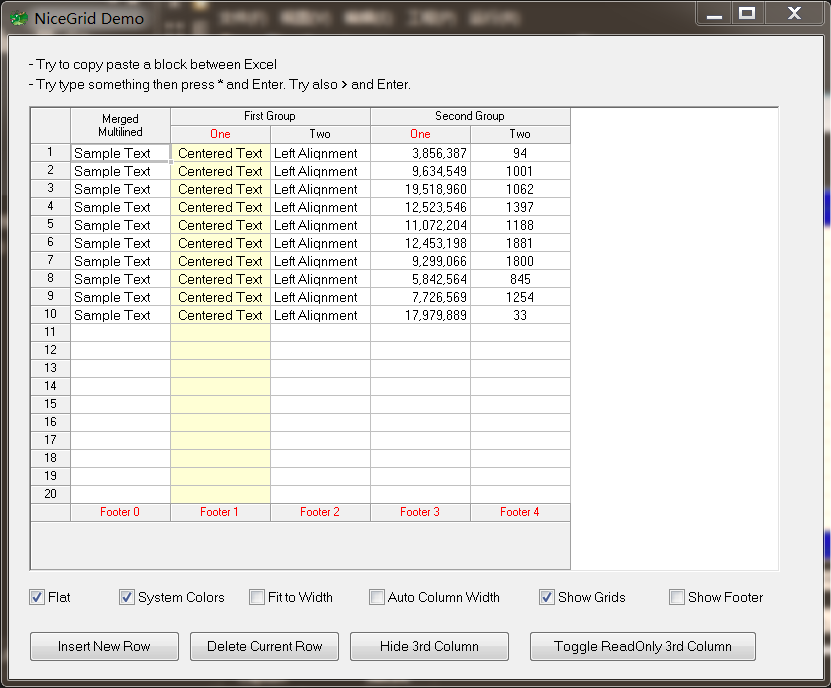
文件结构
NiceGridBasicDemo/
├── Extractor_Icon.ico
├── Project1.py
├── Project1.xml
├── main.py
├── main.pydfm
├── main.sct
├── main.sfm
主程序文件: Project1.py
from glcl import *
from main import *

def main():
    Application.Initialize()
    Application.Title = 'Project1'
    Application.MainFormOnTaskbar = True
    Application.Icon.LoadFromFile(os.path.join(os.path.dirname(os.path.abspath(__file__)), "Extractor_Icon.ico"))
    mForm = MainForm(Application)
    mForm.Show()
    FreeConsole()
    Application.Run()
    mForm.Free()

if __name__ == '__main__':
    main()
单元文件: main.py
import os
from glcl import *
import random

class MainForm(Form):

    def __init__(self, owner):
        self.NiceGrid1 = NiceGrid(self)
        self.CheckBox1 = CheckBox(self)
        self.CheckBox2 = CheckBox(self)
        self.CheckBox3 = CheckBox(self)
        self.CheckBox4 = CheckBox(self)
        self.CheckBox5 = CheckBox(self)
        self.Label1 = Label(self)
        self.Label2 = Label(self)
        self.Button1 = Button(self)
        self.Button2 = Button(self)
        self.Button3 = Button(self)
        self.Button4 = Button(self)
        self.CheckBox6 = CheckBox(self)
        # 从pydfm文件加载窗体属性(窗体设计器生成的)
        self.LoadProps(os.path.join(os.path.dirname(os.path.abspath(__file__)), "main.pydfm"))
        # 绑定控件事件处理方法
        self.Button4.OnClick = self.Button4Click
        self.Button1.OnClick = self.Button1Click
        self.Button3.OnClick = self.Button3Click
        self.Button2.OnClick = self.Button2Click
        self.CheckBox6.OnClick = self.CheckBox6Click
        self.CheckBox4.OnClick = self.CheckBox4Click
        self.CheckBox5.OnClick = self.CheckBox5Click
        self.CheckBox3.OnClick = self.CheckBox3Click
        self.CheckBox2.OnClick = self.CheckBox2Click
        self.CheckBox1.OnClick = self.CheckBox1Click
        self.NiceGrid1.OnDrawHeader = self.NiceGrid1DrawHeader # 表头绘制事件

        # 开始批量更新表格(提高性能)
        self.NiceGrid1.BeginUpdate()
        # 初始化表格数据(10行示例数据)
        for x in range(0, 10):
            self.NiceGrid1[0, x] = 'Sample Text'    # 第1列:示例文本
            self.NiceGrid1[1, x] = 'Centered Text'  # 第2列:居中文本
            self.NiceGrid1[2, x] = 'Left Alignment' # 第3列:左对齐文本
            self.NiceGrid1[3, x] = '{:,}'.format(random.randint(0, 19999999))   # 第4列:格式化随机数
            self.NiceGrid1[4, x] = str(random.randint(0, 1999)) # 第5列:随机数
        # 结束批量更新
        self.NiceGrid1.EndUpdate()
        # 初始化复选框2状态
        self.CheckBox2Click(None)

    def NiceGrid1DrawHeader(self, Sender, ACanvas, Rc, Str, Handled):
        if (Str == 'One'):
            ACanvas.Font.Color = clRed

    # 复选框1点击事件(控制表格平面样式)
    def CheckBox1Click(self, Sender):
        self.NiceGrid1.Flat = self.CheckBox1.Checked

    # 复选框2点击事件(控制表格标题样式)
    def CheckBox2Click(self, Sender):
        if self.CheckBox2.Checked:
            #self.NiceGrid1.GridColor = clBtnShadow
            self.NiceGrid1.HeaderColor = clBtnFace
            self.NiceGrid1.HeaderDarkColor = clBtnShadow
            self.NiceGrid1.HeaderLightColor = clBtnHighlight
            self.NiceGrid1.HeaderFont.Color = clBlack
            self.NiceGrid1.GutterFont.Color = clBlack
        else:
            #self.NiceGrid1.GridColor = clGray
            self.NiceGrid1.HeaderColor = 0x00DF0000 # 深红色
            self.NiceGrid1.HeaderDarkColor = clBlack    # 黑色
            self.NiceGrid1.HeaderLightColor = 0x00FF8000    # 橙色
            self.NiceGrid1.HeaderFont.Color = clWhite   # 白色
            self.NiceGrid1.GutterFont.Color = clWhite   # 白色

    # 复选框3点击事件(控制表格自动适应宽度)
    def CheckBox3Click(self, Sender):
        self.NiceGrid1.FitToWidth = self.CheckBox3.Checked

    # 复选框5点击事件(控制网格线显示)
    def CheckBox5Click(self, Sender):
        self.NiceGrid1.ShowGrid = self.CheckBox5.Checked

    # 复选框4点击事件(控制自动列宽)
    def CheckBox4Click(self, Sender):
        self.NiceGrid1.AutoColWidth = self.CheckBox4.Checked

    # 复选框6点击事件(控制页脚显示)
    def CheckBox6Click(self, Sender):
        self.NiceGrid1.ShowFooter = not self.NiceGrid1.ShowFooter

    # 按钮2点击事件(在当前行插入新行)
    def Button2Click(self, Sender):
        self.NiceGrid1.InsertRow(self.NiceGrid1.Row)

    # 按钮3点击事件(删除当前行)
    def Button3Click(self, Sender):
        self.NiceGrid1.DeleteRow(self.NiceGrid1.Row)

    # 按钮1点击事件(切换第3列可见性)
    def Button1Click(self, Sender):
        self.NiceGrid1.Columns[2].Visible = not self.NiceGrid1.Columns[2].Visible

    # 按钮4点击事件(切换第3列只读状态)
    def Button4Click(self, Sender):
        self.NiceGrid1.Columns[2].ReadOnly = not self.NiceGrid1.Columns[2].ReadOnly
设计文件: main.sct
def NiceGrid1DrawHeader(Sender, ACanvas, Rc, Str, Handled):
def NiceGrid1InsertRow(Sender, ARow):
def CheckBox1Click(Sender):
def CheckBox2Click(Sender):
def CheckBox3Click(Sender):
def CheckBox5Click(Sender):
def CheckBox4Click(Sender):
def CheckBox6Click(Sender):
def Button2Click(Sender):
def Button3Click(Sender):
def Button1Click(Sender):
def Button4Click(Sender):
设计文件: main.sfm
object MainForm: TForm
  Left = 0
  Top = 0
  Caption = 'NiceGrid Demo'
  ClientHeight = 514
  ClientWidth = 651
  Color = clBtnFace
  Font.Charset = DEFAULT_CHARSET
  Font.Color = clWindowText
  Font.Height = -11
  Font.Name = 'MS Sans Serif'
  Font.Style = []
  Position = poDesktopCenter
  DesignSize = (
    651
    514)
  TextHeight = 13
  object Label1: TLabel
    Left = 16
    Top = 16
    Width = 199
    Height = 13
    Caption = '- Try to copy paste a block between Excel'
    Color = clBtnFace
    ParentColor = False
  end
  object Label2: TLabel
    Left = 16
    Top = 32
    Width = 307
    Height = 13
    Caption =
      '- Try type something then press * and Enter. Try also > and Ente' +
      'r.'
    Color = clBtnFace
    ParentColor = False
  end
  object NiceGrid1: TNiceGrid
    Left = 16
    Top = 56
    Width = 601
    Height = 373
    Cursor = 101
    ColCount = 5
    RowCount = 20
    AutoAddRow = True
    DefColWidth = 100
    GridColor = clSilver
    HeaderLine = 2
    HeaderColor = 14614528
    HeaderLightColor = 16744448
    HeaderDarkColor = clBlack
    HeaderFont.Charset = DEFAULT_CHARSET
    HeaderFont.Color = clWhite
    HeaderFont.Height = -11
    HeaderFont.Name = 'MS Sans Serif'
    HeaderFont.Style = []
    FooterFont.Charset = DEFAULT_CHARSET
    FooterFont.Color = clRed
    FooterFont.Height = -11
    FooterFont.Name = 'MS Sans Serif'
    FooterFont.Style = []
    SelectionColor = 13816575
    Columns = <
      item
        Title = 'Merged;Multilined|Merged;Multilined'
        Footer = 'Footer 0'
        Width = 100
        CanResize = False
      end
      item
        Title = 'First Group|One'
        Footer = 'Footer 1'
        Width = 100
        Color = 14024703
        HorzAlign = haCenter
        Strings.Strings = (
          'Satu'
          'Dua'
          'Tiga')
      end
      item
        Title = 'First Group|Two'
        Footer = 'Footer 2'
        Width = 100
      end
      item
        Title = 'Second Group|One'
        Footer = 'Footer 3'
        Width = 100
        Color = clWhite
        HorzAlign = haRight
      end
      item
        Title = 'Second Group|Two'
        Footer = 'Footer 4'
        Width = 100
        HorzAlign = haCenter
      end>
    GutterKind = gkNumber
    GutterWidth = 40
    GutterFont.Charset = DEFAULT_CHARSET
    GutterFont.Color = clWhite
    GutterFont.Height = -11
    GutterFont.Name = 'MS Sans Serif'
    GutterFont.Style = []
    ShowFooter = True
    Font.Charset = DEFAULT_CHARSET
    Font.Color = clWindowText
    Font.Height = -11
    Font.Name = 'MS Sans Serif'
    Font.Style = []
    Anchors = [akLeft, akTop, akRight, akBottom]
    TabOrder = 0
  end
  object CheckBox1: TCheckBox
    Left = 16
    Top = 439
    Width = 37
    Height = 19
    Anchors = [akLeft, akBottom]
    Caption = 'Flat'
    Checked = True
    State = cbChecked
    TabOrder = 1
    OnClick = CheckBox1Click
  end
  object CheckBox2: TCheckBox
    Left = 88
    Top = 439
    Width = 93
    Height = 19
    Anchors = [akLeft, akBottom]
    Caption = 'System Colors'
    Checked = True
    State = cbChecked
    TabOrder = 2
    OnClick = CheckBox2Click
  end
  object CheckBox3: TCheckBox
    Left = 192
    Top = 439
    Width = 80
    Height = 19
    Anchors = [akLeft, akBottom]
    Caption = 'Fit to Width'
    TabOrder = 3
    OnClick = CheckBox3Click
  end
  object CheckBox4: TCheckBox
    Left = 288
    Top = 439
    Width = 125
    Height = 19
    Anchors = [akLeft, akBottom]
    Caption = 'Auto Column Width'
    TabOrder = 4
    OnClick = CheckBox4Click
  end
  object CheckBox5: TCheckBox
    Left = 424
    Top = 439
    Width = 77
    Height = 19
    Anchors = [akLeft, akBottom]
    Caption = 'Show Grids'
    Checked = True
    State = cbChecked
    TabOrder = 5
    OnClick = CheckBox5Click
  end
  object Button1: TButton
    Left = 272
    Top = 476
    Width = 129
    Height = 25
    Anchors = [akLeft, akBottom]
    Caption = '&Hide 3rd Column'
    TabOrder = 8
    OnClick = Button1Click
  end
  object Button2: TButton
    Left = 16
    Top = 476
    Width = 121
    Height = 25
    Anchors = [akLeft, akBottom]
    Caption = '&Insert New Row'
    TabOrder = 6
    OnClick = Button2Click
  end
  object Button3: TButton
    Left = 144
    Top = 476
    Width = 121
    Height = 25
    Anchors = [akLeft, akBottom]
    Caption = '&Delete Current Row'
    TabOrder = 7
    OnClick = Button3Click
  end
  object Button4: TButton
    Left = 416
    Top = 476
    Width = 182
    Height = 25
    Anchors = [akLeft, akBottom]
    Caption = 'Toggle ReadOnly 3rd Column'
    TabOrder = 9
    OnClick = Button4Click
  end
  object CheckBox6: TCheckBox
    Left = 528
    Top = 439
    Width = 84
    Height = 19
    Anchors = [akLeft, akBottom]
    Caption = 'Show Footer'
    TabOrder = 10
    OnClick = CheckBox6Click
  end
end
其他文件
- Extractor_Icon.ico
- main.py
- Project1.xml
详细分析
功能概述
网格组件演示
使用的组件
(未检测到具体组件)
技术特点
(未检测到特殊技术特点)