NiceGridOwnerDrawDemo 项目分析
项目信息
- 项目名称: NiceGridOwnerDrawDemo
- 下载链接: NiceGridOwnerDrawDemo.rar
- 分析时间: 2026-03-05
运行截图
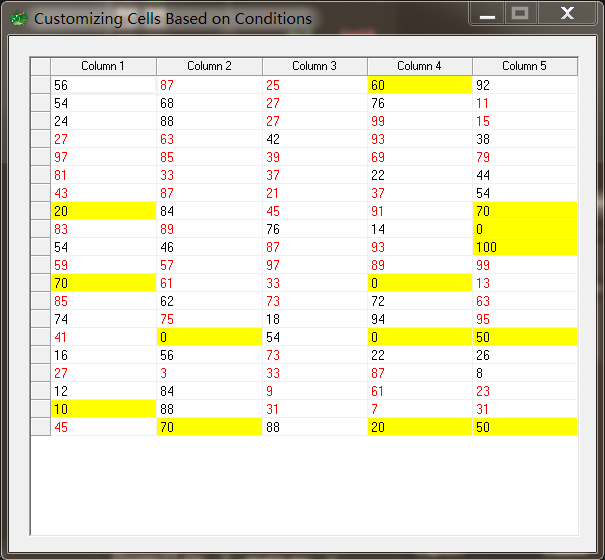
文件结构
NiceGridOwnerDrawDemo/
├── Extractor_Icon.ico
├── Project1.py
├── Project1.xml
├── main.py
├── main.pydfm
├── main.sct
├── main.sfm
主程序文件: Project1.py
from glcl import *
from main import *

def main():
    Application.Initialize()
    Application.Title = 'Project1'
    Application.MainFormOnTaskbar = True
    Application.Icon.LoadFromFile(os.path.join(os.path.dirname(os.path.abspath(__file__)), "Extractor_Icon.ico"))
    mForm = MainForm(Application)
    mForm.Show()
    FreeConsole()
    Application.Run()
    mForm.Free()

if __name__ == '__main__':
    main()
单元文件: main.py
import os
from glcl import *
import random

class MainForm(Form):

    def __init__(self, owner):
        self.NiceGrid1 = NiceGrid(self)
        # 从pydfm文件加载窗体属性(窗体设计器生成的)
        self.LoadProps(os.path.join(os.path.dirname(os.path.abspath(__file__)), "main.pydfm"))
        # 绑定表格单元格绘制事件
        self.NiceGrid1.OnDrawCell = self.NiceGrid1DrawCell

        # 初始化表格数据(20行5列的随机数)
        for x in range(0, 20):
            self.NiceGrid1.Cells[0, x] = str(random.randint(0, 100))
            self.NiceGrid1.Cells[1, x] = str(random.randint(0, 100))
            self.NiceGrid1.Cells[2, x] = str(random.randint(0, 100))
            self.NiceGrid1.Cells[3, x] = str(random.randint(0, 100))
            self.NiceGrid1.Cells[4, x] = str(random.randint(0, 100))

    # 表格单元格绘制事件处理
    def NiceGrid1DrawCell(self, Sender, ACanvas, X, Y, Rc, Handled):
        """
        参数:
            Sender: 事件发送者
            ACanvas: 画布对象,用于绘制单元格
            X: 列索引
            Y: 行索引
            Rc: 单元格矩形区域
            Handled: 是否已处理标志
        """
        # 获取当前单元格的整数值
        i = int(self.NiceGrid1.Cells[X, Y])
        # 如果是奇数,设置文字颜色为红色
        if i & 1 == 1:
            ACanvas.Font.Color = clRed
        # 如果能被10整除,设置单元格背景为黄色
        if ((i % 10) == 0):
            ACanvas.Brush.Color = clYellow
设计文件: main.sct
设计文件: main.sfm
object MainForm: TMainForm
  Left = 0
  Top = 0
  BorderIcons = [biSystemMenu, biMinimize]
  BorderStyle = bsSingle
  Caption = 'Customizing Cells Based on Conditions'
  ClientHeight = 413
  ClientWidth = 474
  Color = clBtnFace
  Font.Charset = DEFAULT_CHARSET
  Font.Color = clWindowText
  Font.Height = -11
  Font.Name = 'MS Sans Serif'
  Font.Style = []
  OldCreateOrder = True
  Position = poDesktopCenter
  PixelsPerInch = 96
  TextHeight = 13
  object NiceGrid1: TNiceGrid
    Left = 16
    Top = 16
    Width = 441
    Height = 385
    Cursor = 101
    ColCount = 5
    RowCount = 20
    HeaderFont.Charset = DEFAULT_CHARSET
    HeaderFont.Color = clWindowText
    HeaderFont.Height = -11
    HeaderFont.Name = 'MS Sans Serif'
    HeaderFont.Style = []
    FooterFont.Charset = DEFAULT_CHARSET
    FooterFont.Color = clWindowText
    FooterFont.Height = -11
    FooterFont.Name = 'MS Sans Serif'
    FooterFont.Style = []
    FitToWidth = True
    Columns = <
      item
        Title = 'Column 1'
        Width = 84
      end
      item
        Title = 'Column 2'
        Width = 84
      end
      item
        Title = 'Column 3'
        Width = 83
      end
      item
        Title = 'Column 4'
        Width = 83
      end
      item
        Title = 'Column 5'
        Width = 83
      end>
    GutterFont.Charset = DEFAULT_CHARSET
    GutterFont.Color = clWindowText
    GutterFont.Height = -11
    GutterFont.Name = 'MS Sans Serif'
    GutterFont.Style = []
    ShowFooter = False
    Font.Charset = DEFAULT_CHARSET
    Font.Color = clWindowText
    Font.Height = -11
    Font.Name = 'MS Sans Serif'
    Font.Style = []
    TabOrder = 0
  end
end
其他文件
- Extractor_Icon.ico
- main.py
- Project1.xml
详细分析
功能概述
网格组件演示
使用的组件
(未检测到具体组件)
技术特点
(未检测到特殊技术特点)